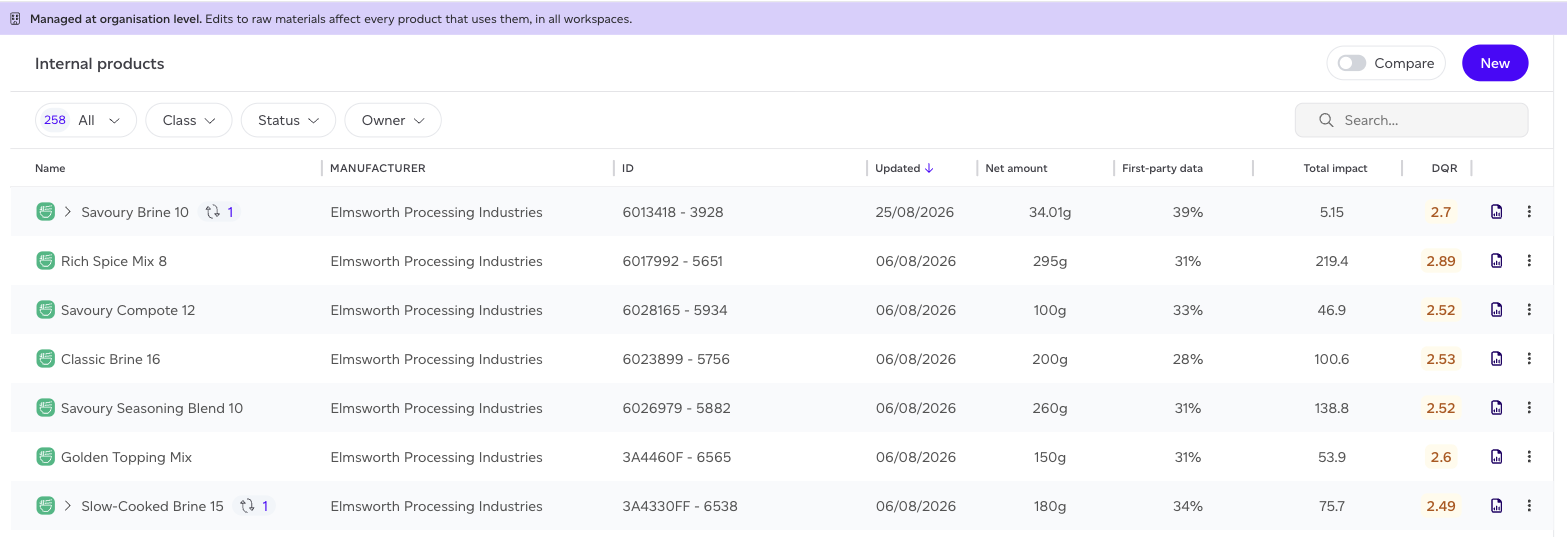
Internal products are the things you make for your own use rather than sell: a sauce, a brine, a filling that goes into something else. They were previously called internal raw materials. The name changed because that is what they are, intermediate products you manufacture, and the old name borrowed a word from a section they are not in.
Find them under Products > Internal products.
Made or bought
Every internal product is either made or bought, and that decides which list it is in:
| Choice | What it means | Listed under |
|---|---|---|
| Made by us or a co-manufacturer | You make it, in your own facility or through a co-manufacturer that makes it for you | Products > Internal products |
| Bought finished | You buy it finished from a provider | Supply chain > Raw materials, as a purchased good |
Set it in the product's details, under Made or bought (the info icon beside it explains the choice). It is set for you when you create the product:
- Created from Internal products, or a sold product changed to an internal one: made.
- Imported from Internal products: made. The import asks whether you make it yourself or a co-manufacturer does.
- Imported from Purchased goods, or taken from the Sustained Registry: bought.
Who owns the production facility does not decide it. A co-manufacturer's facility belongs to a third party, but a product it makes for you is still yours, so it stays under Internal products. Products created before this choice existed keep their list until you change it: for those, a product made in a third party's facility was listed as bought.
A purchased good bound to a Sustained Registry listing is always bought. Unbind it to mark it as made.
The list is organisation-wide
The banner at the top says 'Managed at organisation level', and it is not decoration. Raw materials are shared across every workspace in your organisation, so editing one changes every product that uses it, everywhere, and those products are recalculated for you without being edited. This is deliberate: one ingredient should mean one thing across your whole portfolio. To change where a raw material's impacts come from, see How do I manage raw materials.
The columns answer the questions people actually open this list to ask:
- First-party data: what share of this item's model is your own data rather than a database default. Higher is better, and it is the single biggest lever on data quality.
- DQR: the computed Data Quality Rating for the item, where 1 is best and 5 is worst. See Understanding your data quality score.
- Total impact: impact points for the net amount shown, so two rows are comparable.
Following an ingredient to what contains it
Some rows carry a small chain icon with a number next to the name. That means the item sits inside something else, and the number is how many containers it appears in.

Expanding the row shows where it is used. Hovering the chain shows the full path without leaving the list. This exists because an ingredient inside a sub-recipe used to be invisible here: you could see the sub-recipe, but not what it was made of, and the impact of the thing you actually buy was hidden a level down.
Which data is yours
The Raw material origin card on the Home dashboard counts your sources by where the data comes from:
- Computed: calculated from activity data you recorded for your own farm or site.
- Registry: supplied by the producer through the Sustained Registry.
- Override: your own measured or supplied figure, entered against the source.
- Secondary: a background database dataset, which is the starting point for everything you have not replaced.
Each source counts once, so a trace ingredient counts the same as a major one. For the contribution-weighted picture, which is what actually moves your footprint, open a product report. To see the same split for each raw material, with whose figure it is, use the Impacts source column in Supply chain > Raw materials.