GHG Protocol reporting is an optional add-on on Footprinting and above, including accounts set up before our packages existed; it is not sold with Recipe & Menu Design. If the GHG option in the dropdown is greyed out and marked "Add-on", your account does not include it yet: go to Settings, then Company, then Subscription to add it (card-paying accounts) or to see whom to contact (accounts managed by our team).
To access these reports, navigate to your Products tab and click the report icon for your desired product. This opens the Impact Report Overview, which displays the PEF report by default.
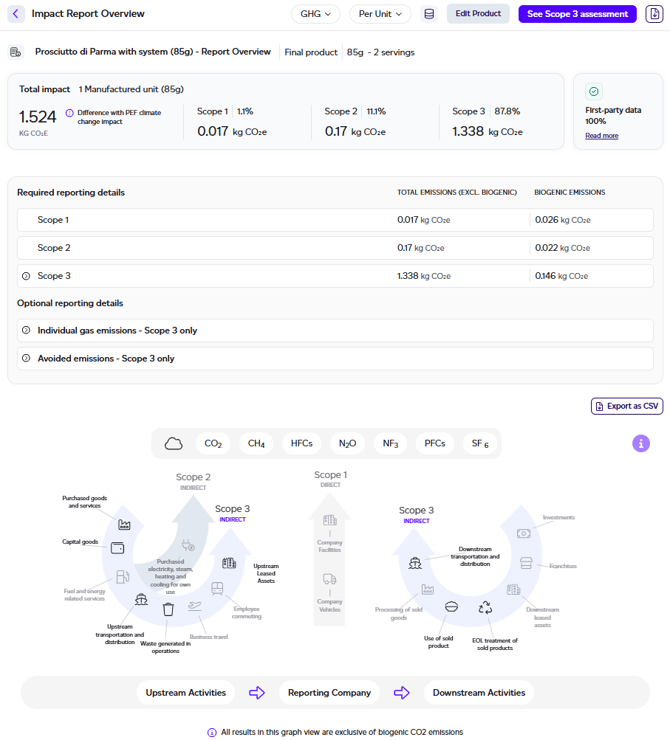
To switch to the GHG Protocol assessment, select GHG in the dropdown at the top of the page. The resulting dashboard shows estimated Scope 1, 2, and 3 emissions specific to the product.
Important limitation: This assessment covers only product-related emissions and should not be considered a complete organisational Scope 1, 2, and 3 evaluation. Scope 1 and 2 calculations rely primarily on secondary data and are intended for reference purposes only.
Dashboard Components
The GHG Protocol dashboard provides:
- Product Overview: Name, net amount, servings, and product type.
- Total Estimated Emissions: Overall emissions plus scope breakdown in kg CO2e and percentages.
- First Party Data level: Status indicator showing whether the product is incomplete, uses default assumptions, or achieved 100% first-party data.
- Scope 1/2/3 Breakdown: Detailed emissions by scope with expandable subcategories, including biogenic emissions reported separately. The Scope 3 total covers required emissions only, with optional emissions (use of sold products and consumer travel from the store) shown alongside it; see below.
- Optional reporting: Individual gas emissions and avoided emissions from recycling.
- Circularity (when the product uses co-products or residues): its own section after avoided emissions, in kg CO2e: the share of input mass from co-products and residues and the emissions they avoid compared with the conventional ingredients they replace. It is not subtracted from the total and is kept apart from the avoided emissions from recycling. See Circular ingredients: co-products and residues.
- Scope 2, both ways: the Scope 2 figure is market-based, from the emissions factor of the electricity supply chosen on each production step or set for its site (falling back to the grid where neither was), with the location-based figure, from each facility country's grid mix, shown beneath it. If it says Partial, some internal products were calculated before the location-based figure existed: recalculate the workspace.
- Land sector (FLAG): Land-sector emissions (land use change and land management) reported separately from energy and industry, per the SBTi FLAG guidance, with their own export.
- Land Sector and Removals Standard: every scope and Scope 3 category split into fossil and industrial, land use change, land management production and biogenic product emissions, following the GHG Protocol standard as WRAP's Scope 3 guidance applies it, with the biogenic CO₂ of food disposal reported outside the total. A Spatial boundary table shows whether each raw material's land emissions are accounted at country (jurisdiction), global or your own lands, and Raw materials by origin lists them. Removals are not assessed and never netted off.
- PACT: The product's draft PACT footprint and any gaps, with Publish to PACT. See Connecting a PACT Client.
- GHG Protocol Graph: Visual representation across all in-scope categories.
You can export this data as CSV by clicking the export button.
What the Scope 3 total covers
The Scope 3 total covers the emissions the GHG Protocol requires you to report. Two kinds of emissions that it treats as optional are reported as optional emissions shown alongside the Scope 3 total, rather than added to it:
- Use of sold products (Category 11): preparation, home storage and washing-up by the consumer.
- Consumer travel from the store (Category 9): the trip that takes the product from the store to the consumer's home.
If your reporting includes optional emissions, add them to the Scope 3 total yourself.
Rented facilities are treated as held under an operating lease and within your operational control, so their emissions are reported in Scope 1 and 2 and the relevant Scope 3 categories, in the same way as facilities you own. Category 8 (upstream leased assets) is therefore out of scope.
The full mapping of every activity to its scope and category is on the Methodology page in the app, under GHG Protocol.
Accessing Detailed Reports
Click 'See Scope 3 Assessment' to view the comprehensive report. This detailed version is only available when your product contains 100% first-party data. Products below this threshold will display a warning about unmet screening LCA thresholds.
The detailed report mirrors the PEF Report structure but replaces the LCIA tab with a Results section containing the GHG Protocol graph and scope breakdown table. Additional appendices cover Global Warming Potential Factors and Organisational Boundaries Assumptions. Like the PEF report, it carries the Allocation and circularity note in Goal & Scope and the appendix, and the Food loss and waste appendix for a food product.
A GHG report printed to PDF carries the figures under its collapsed sections too.