The activity log records who changed what in your organisation: products, models, reports, users, settings and evidence. Entries are written once, never edited, and kept for seven years.
Open Activity log at the bottom of the left rail. Global Admins and assurance users see it.
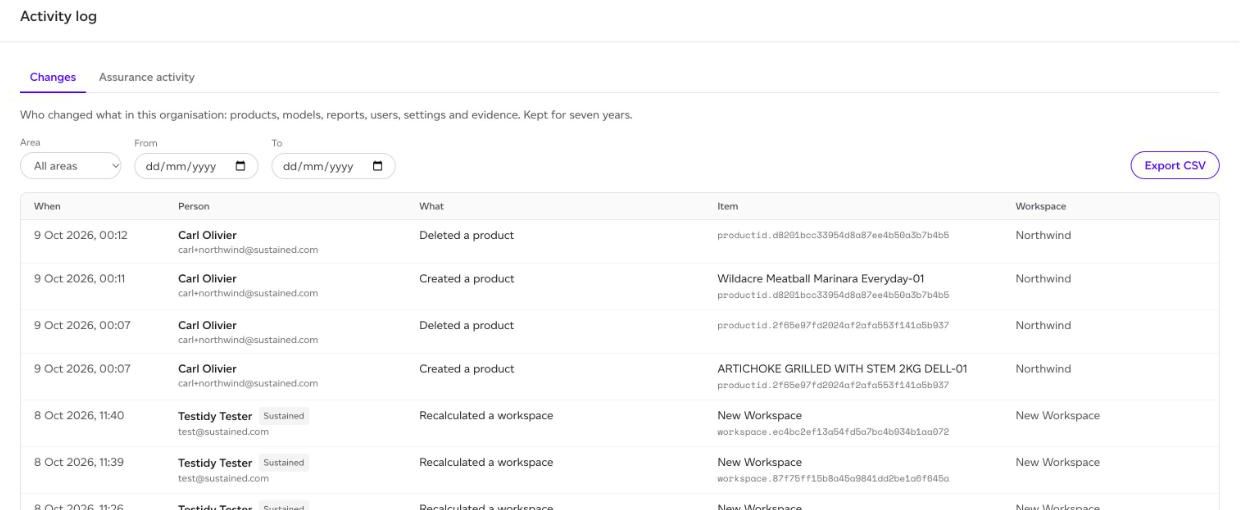
The two logs
- Changes: creates, updates, deletes, moves, imports, uploads, recalculations and password changes, across every workspace.
- Assurance activity (Global Admins only): what assurance users opened, downloaded and signed in to, kept apart from the change log.
Reading it
Each entry shows When, the Person (with their email), What they did, the Item it was done to and the Workspace. A tag beside the name says who acted other than one of your users: Sustained for our team (for example, a recalculation after a data release), Assurance for an assurance user, API for a change through the partner API, and System for the platform itself.
Filter by Area (Products, Models, Reports, Evidence, Supply chain, Targets, Folders, Users, Settings, or Sign-ins on the assurance log) and by From and To dates. Click a person's name to show only their entries. Show older entries loads more.
Exporting
Export CSV downloads the entries that match your filters, with the time in UTC, the person, the area, the action, the item and its id, the workspace and the source. An export holds up to 50,000 rows; narrow the dates to export more than that in parts.