A baseline is the reference your progress is measured against, so it is never thrown away. Resetting it keeps a read-only copy, and restating its risk figures keeps the figures it had before.
Resetting a baseline
Reset baseline is in the header of the current baseline. It asks Why are you resetting it? with five reasons:
- A methodology or risk engine change
- A change of scope, or an acquisition
- Moving to a new baseline period
- Correcting the data
- Something else (tell us why, in up to 500 characters)
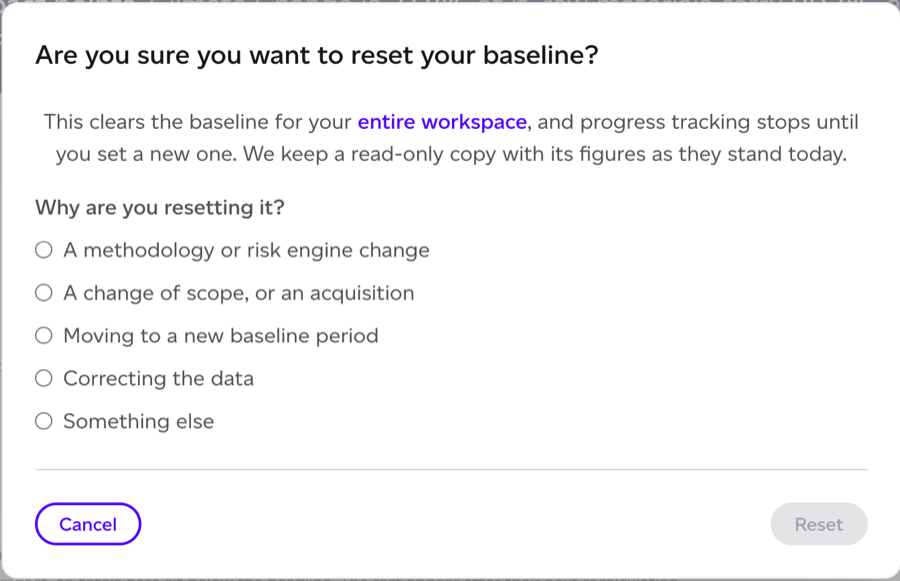
Reset stays off until you pick one. Resetting clears the baseline for your entire workspace, and progress tracking stops until you set a new one. We keep a read-only copy with its figures as they stand on the day you reset it.
Assurance users cannot reset a baseline, and neither can accounts whose subscription our team manages.
Past baselines
Performance > Baseline lists the baselines your workspace has replaced under Past baselines, below the report, and on the empty page after a reset. Each row gives the Period, when it was Replaced, Why, its Impact points, who set it (Set by) and who replaced it (Replaced by). Click a period to open that baseline, read-only.

Once a baseline has been replaced, a selector in the header of the baseline report switches between Baseline (the current one) and each past one, for example "Baseline, Jan to Dec 2024 (replaced 7 Nov 2026)". It keeps the tab you are on. On Analytics > Risk, the report picker offers past baselines too. Business, ESG and the Home dashboard always read the current baseline.

A past baseline shows a banner on every tab and in its PDF: "This is a past baseline, Jan to Dec 2024. It was replaced on 7 Nov 2026 (the reason), and its figures are as they stood on that date." View the current baseline takes you back.
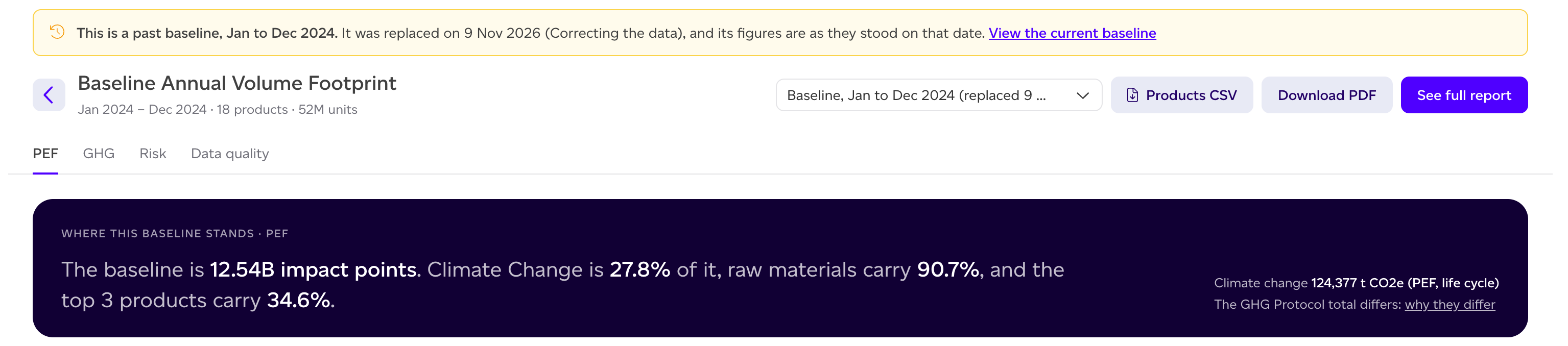
A past baseline is a record, so some things are not offered on it: Reset baseline, model changes, the Risk Trend and Risk × sourcing tabs, the climate disclosure pack and the CSVs built on our side. A view that was not stored when the baseline was replaced says "This view is not available for this past baseline". Its downloads are named for it, for example "Past baseline, Jan to Dec 2024 (replaced 7 Nov 2026)".
When progress compares a new baseline
Progress tracking and the Risk Trend tab measure against the current baseline. After a reset, a note says so: "Progress is measured against the current baseline, which replaced the Jan to Dec 2024 baseline on 7 Nov 2026. The past baseline is not on this chart." View the past baseline opens it.
Restating risk figures
This part applies where the baseline carries risk figures, on plans with Climate & Nature risk (Risk & Analytics).
A baseline freezes its risk figures on the risk engine of the day. When the engine is updated, a line on the Baseline page and on Analytics > Risk says so, for example "These risk figures were frozen on engine v3.1. Engine v3.2 is current: cyclone losses no longer count winds below storm force." Where the line cannot say what changed, What changed opens Help > Release notes.
Restate keeps the baseline's period, products and volumes, and re-freezes its risk figures on the current risk engine. Today's figures are kept as a past baseline you can open at any time, which reads "This is the Jan to Dec 2024 baseline before it was restated", with the reason Restated on a newer risk engine. Because the period and products stay the same, restating does not change progress tracking.
Restating runs in the background and usually takes a few minutes. While it runs, the line says Restating and the page updates when it finishes. If a run does not finish, the figures are unchanged and Restate again tries once more.
Assurance users cannot restate a baseline, and neither can accounts whose subscription our team manages.