The quickest way to your suppliers' data is to ask them. A supplier on Sustained gets your request in their Registry Inbox; anyone else is emailed a link and answers through a form, with no account needed.
Request data from a supplier
Click Request data from a supplier at the top of the Registry > Inbox. You can also start a request from a supplier's row on Supply chain > Providers & suppliers (or Registry > Suppliers).
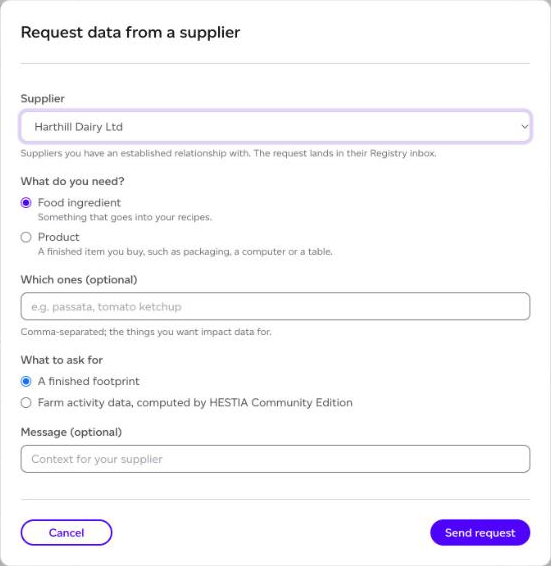
- Supplier: pick a supplier you already have a relationship with, and the request lands in their Registry Inbox. Choose Another supplier, by email to ask anyone else, and enter their Supplier email.
- What do you need?: Food ingredient (something that goes into your recipes) or Product (a finished item you buy, such as packaging, a computer or a table). Plans with every category can also ask for a Material, such as steel, cotton or timber. For a product or material, choose its Category.
- Which ones (optional): the things you want impact data for, separated by commas.
- What to ask for: A finished footprint, or, for an ingredient, Farm activity data, computed by HESTIA Community Edition, where the farm records its season and the footprint is computed for it.
- Message (optional): context for your supplier.
Click Send request.
Asking item by item
On the Registry plan, you can ask about the items on your purchasing list one by one. On Registry > Purchased raw materials, use a row's menu: Request data for this item, or Request data for everything from that supplier (up to 500 items in one request).
The supplier answers or declines each item on its own, and each answer comes back to the item it is for. Two options are only on item requests:
- Show my purchased goods codes: your supplier sees your code next to each item. Otherwise they see its name, GTIN and their own product code.
- Ask for evidence: your supplier is asked to attach a supporting document, such as a certificate or a report, with each answer. An answer then cannot be accepted until a clean file is attached.
Asking about a listing
On a listing you found in the Registry, the menu offers Request data (or Request fresher data), Request introduction (to exchange contacts) and Confirm existing relationship (to make the listing production-valid), where the publisher allows them.
After you send it
The request waits under Waiting on them in the Inbox, saying where it stands: not opened yet, opened, agreed to share but nothing published yet, or, for several items, how many are answered. A request turns stale after 14 days without an answer.
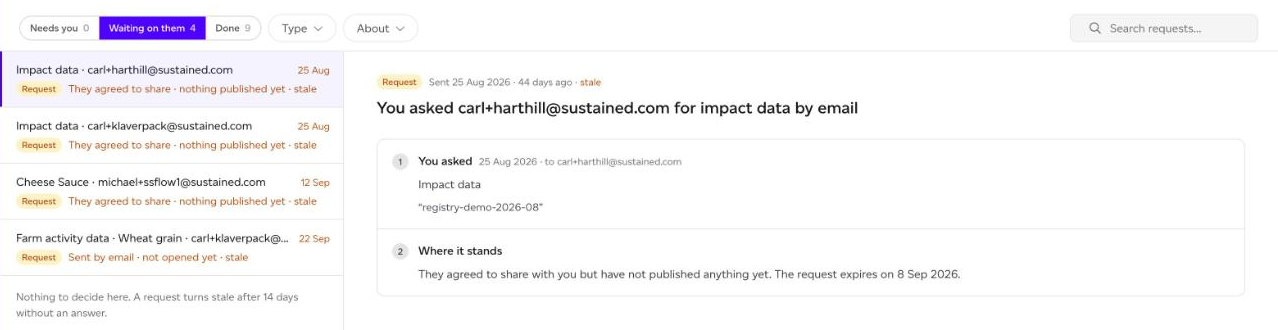
Open it to Withdraw request if you no longer need it. When the supplier answers, the answer moves to Needs you for you to accept. See How do I use the Registry Inbox?
If the email to your supplier could not be sent, the Inbox shows a one-time link for you to pass on yourself.