The UK packaging EPR file is the file you upload to the UK government's Report Packaging Data service: packaging weight by material, household or not, and class, summed over the units in your reports for each half-year. Open Disclosures > Packaging in the left rail.
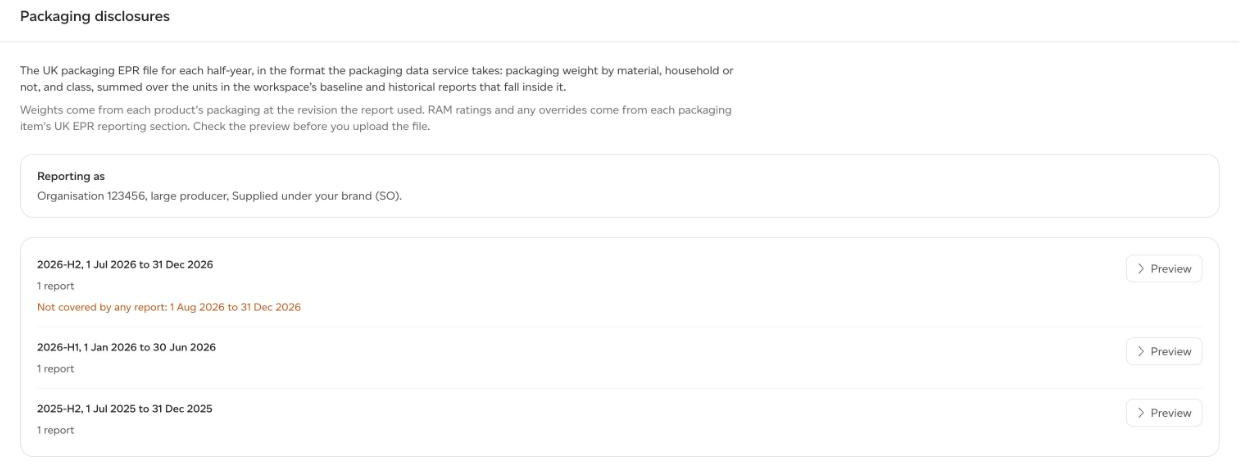
Sustained produces the file. You check it and upload it yourself; we do not submit your EPR return.
Set up your packaging data account
A company admin enters your account details once, on Company analytics > Disclosures > Packaging, under Your packaging data account:
- Organisation ID: the 6-digit number from your packaging data account.
- Organisation size: Large producer (L). Small producer files are not supported yet, because small producers report yearly with their own packaging type.
- Packaging activity: Supplied under your brand (SO), Packed or filled as unbranded (PF), Imported (IM), Supplied as empty (SE), Hired or loaned (HL), or Supplied through an online marketplace you own (OM).
- Subsidiary IDs: only for a group registration whose subsidiaries report separately. A workspace with a subsidiary ID gets lines of its own; the rest are reported under the organisation.
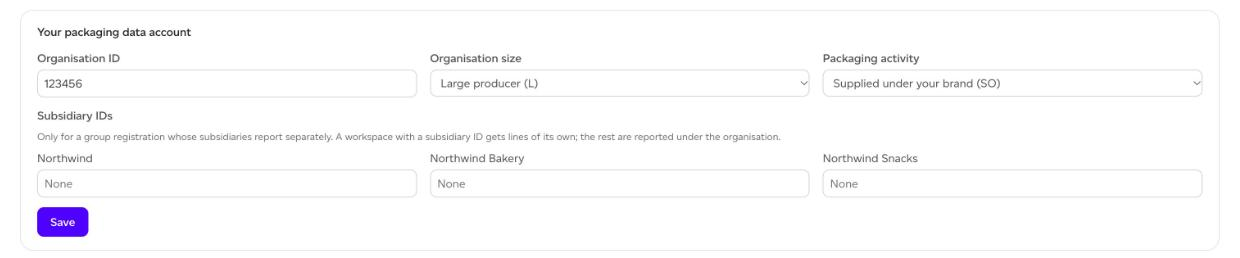
Each workspace's page then shows who you are Reporting as.
The EPR fields on each packaging item
Weights come from each product's packaging at the revision the report used. The classification comes from the UK EPR reporting section at the bottom of each packaging item, in the consumer-facing and transport packaging editors. Every field starts on a value worked out for you (As derived), which you can override:
- Packaging type: Household (HH), Non-household (NH), Public bin (PB) or Reusable (RU). Derived as household for the packaging closest to a final product, otherwise non-household.
- Packaging class: Primary (P1), Secondary (P2), Shipment (P3), Tertiary (P4) or Non-primary reusable (P5), derived from the packaging level.
- Recyclability rating (RAM): Green, Amber or Red (or their medical variants), or Not rated. Large producers report it for household and public-bin packaging. You enter it: Sustained does not assess it.
- Plastic: Rigid or Flexible, for plastic in household and public-bin packaging.
- Report as: a line per material, or one fibre composite line (for example a beverage carton).
Preview, then download
Each half-year with reports is listed as a row, such as 2026-H1. Click Preview to see the lines the file will hold: type, class, material, subtype, RAM rating and weight, with a summary of the products and units it covers.
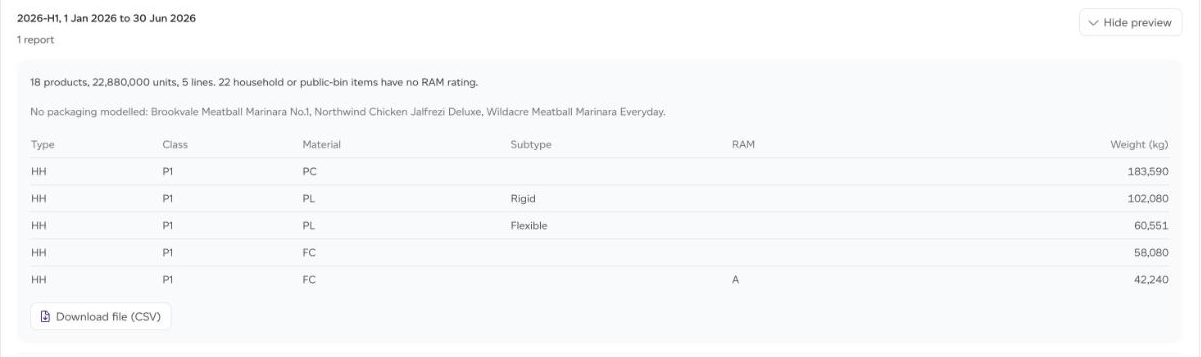
Read the notes above the table before you download. They name household or public-bin items with no RAM rating, products with no packaging modelled, and anything reported as other material. Then click Download file (CSV).
Which reports go into a half-year
- Every historical report wholly inside the half-year, summed.
- The baseline only when no historical report falls inside, and only if the baseline is itself wholly inside the half-year.
Days that no report covers are shown in amber as Not covered by any report. They do not stop the download, but the file understates your packaging for those days.
The file cannot be produced, and the preview says why, when the organisation ID is missing, the size is set to small producer, no report falls inside the half-year, or two reports in a workspace overlap so their days would be counted twice. Remove one of the overlapping reports to fix it.